How to review Workload Events
A workload event is a structured audit record that Aembit generates when application-level traffic flows through Agent Proxy. Workload events capture requests and responses between Client Workloads and Server Workloads across supported application protocols.
These events provide an audit trail for monitoring communication and interactions of workloads within your environment.
Supported protocols
Section titled “Supported protocols”Agent Proxy supports these protocols for workload events:
| Protocol | Event types | Description |
|---|---|---|
| PostgreSQL | postgres.request, postgres.response | Database queries and responses, including authentication, query operations, and copy operations |
| Redshift | redshift.request, redshift.response | Same event structure as PostgreSQL |
| MySQL / MariaDB | mysql.request, mysql.response | Database queries and responses, including connection handshake, command operations, and error packets |
| Redis | redis.request, redis.response | Authentication commands and success/error responses |
| HTTP | http.request, http.response | HTTP method, URI, headers, and response codes |
| Snowflake | snowflake.request, snowflake.response | HTTP-based queries to Snowflake endpoints |
| Oracle Database | oracleDatabase.request, oracleDatabase.response | Database connection and query events |
| MCP | mcp.request, mcp.response | Model Context Protocol requests and responses |
| TCP Passthrough | tcp.open, tcp.close | Connection-level events when traffic doesn’t match a supported application protocol handler |
Event structure
Section titled “Event structure”Every workload event shares a common JSON structure:
- version - Workload event schema version.
- meta - Event metadata including timestamp, event type, connection and event identifiers, policy ID, action, and severity.
Severity values are
Error,Warning, orInfo. - workload - The identified Client Workload and Server Workload involved in the event.
- network - Network-level details including client and server IP addresses, ports, transport protocol, and proxy port.
- outcome - The result of the event:
Passthrough,Modified, orError, with an optional reason. - application - Protocol-specific data that varies by protocol type.
The following example shows the shape of a workload event:
{ "version": "1.0.0", "meta": { "timestamp": "2026-03-15T14:22:08.000Z", "eventType": "protocol.direction", "connectionId": "3f8b2e1-7c4d-4a91-b5e6-9d2f1c8a4b73", "eventId": "e7a4c9d2-1b3f-4e8a-a6c5-2d9b7f3e1a84", "policyId": "dd987f8c-34fb-43e2-9d43-89d862e6b7ec", "action": "forward", "severity": "Info", "resourceSetId": "ffffffff-ffff-ffff-ffff-ffffffffffff" }, "workload": { "client": { "id": "7c466803-9dd4-4388-9e45-420c57a0432c", "name": "MCP Client App" }, "server": { "id": "49183921-55ab-4856-a8fc-a032af695e0d", "name": "MCP Remote Server" } }, "network": { "clientWorkloadIP": "10.0.1.15", "clientWorkloadPort": 53134, "transportProtocol": "TCP", "serverWorkloadHost": "mcp.example.com", "serverWorkloadIP": "10.0.2.30", "serverWorkloadPort": 443, "proxyPort": 8080 }, "outcome": { "result": "Passthrough" }, "application": { // Protocol-specific fields }}Types of workload events
Section titled “Types of workload events”Workload events can be one of two types:
- Workload request events - when a Client Workload sends a request through Agent Proxy.
- Workload response events - when the Server Workload returns a response.
Workload request events
Section titled “Workload request events”A workload request event captures the details of a request sent from a Client Workload to a Server Workload through Agent Proxy.
- The
eventTypefield follows the patternprotocol.request(for example,mcp.request). - The
applicationblock contains protocol-specific fields. In this example, those fields arehttpMethod,httpVersion,uri, andheaders.
{ "version": "1.0.0", "meta": { "timestamp": "2026-03-15T14:22:08.000Z", "eventType": "mcp.request", "connectionId": "3f8b2e1-7c4d-4a91-b5e6-9d2f1c8a4b73", "eventId": "e7a4c9d2-1b3f-4e8a-a6c5-2d9b7f3e1a84", "policyId": "dd987f8c-34fb-43e2-9d43-89d862e6b7ec", "action": "forward", "severity": "Info", "resourceSetId": "ffffffff-ffff-ffff-ffff-ffffffffffff" }, "workload": { "client": { "id": "7c466803-9dd4-4388-9e45-420c57a0432c", "name": "MCP Client App" }, "server": { "id": "49183921-55ab-4856-a8fc-a032af695e0d", "name": "MCP Remote Server" } }, "network": { "clientWorkloadIP": "10.0.1.15", "clientWorkloadPort": 53134, "transportProtocol": "TCP", "serverWorkloadHost": "mcp.example.com", "serverWorkloadIP": "10.0.2.30", "serverWorkloadPort": 443, "proxyPort": 8080 }, "outcome": { "result": "Modified" }, "application": { "mcp": { "httpMethod": "POST", "httpVersion": "HTTP/1.1", "uri": "/mcp/v1/tools/list", "headers": [ {"content-type": "application/json"}, {"host": "mcp.example.com"} ] } }}Workload response events
Section titled “Workload response events”A workload response event captures the details of a response returned from a Server Workload to a Client Workload through Agent Proxy.
- The
eventTypefield follows the patternprotocol.response(for example,mcp.response). - The
applicationblock includes protocol-specific fields. In this example, those fields arehttpVersion,headers, andhttpResponseCode.
{ "version": "1.0.0", "meta": { "timestamp": "2026-03-15T14:22:08.123Z", "eventType": "mcp.response", "connectionId": "3f8b2e1-7c4d-4a91-b5e6-9d2f1c8a4b73", "eventId": "b2c8d4e6-3a1f-4b7c-9d5e-8f2a6c4b1d73", "policyId": "dd987f8c-34fb-43e2-9d43-89d862e6b7ec", "action": "forward", "severity": "Info", "resourceSetId": "ffffffff-ffff-ffff-ffff-ffffffffffff" }, "workload": { "client": { "id": "7c466803-9dd4-4388-9e45-420c57a0432c", "name": "MCP Client App" }, "server": { "id": "49183921-55ab-4856-a8fc-a032af695e0d", "name": "MCP Remote Server" } }, "network": { "clientWorkloadIP": "10.0.1.15", "clientWorkloadPort": 53134, "transportProtocol": "TCP", "serverWorkloadHost": "mcp.example.com", "serverWorkloadIP": "10.0.2.30", "serverWorkloadPort": 443, "proxyPort": 8080 }, "outcome": { "result": "Passthrough" }, "application": { "mcp": { "httpVersion": "HTTP/1.1", "headers": [ {"content-type": "application/json"} ], "httpResponseCode": 200 } }}Outcome classification
Section titled “Outcome classification”The result field in every workload event indicates how Agent Proxy handled the traffic:
| Outcome | Description |
|---|---|
Passthrough | The request or response passed through Agent Proxy unchanged. |
Modified | Agent Proxy modified the request or response. For example, by injecting credentials. |
Error | Agent Proxy generated an error response to the Client Workload. |
When there is an error, the reason field describes what went wrong.
// ... "outcome": { "result": "Error", "reason": "Unexpected content type from upstream" }, // ...Error priority
Section titled “Error priority”When multiple error sources exist for a single event, the reason field contains the error message
from the highest-priority source:
- Agent-generated errors (highest priority) - Errors generated by Agent Proxy itself.
- Directive errors - Errors specified in the directive from the control plane.
- Server Workload errors (lowest priority) - Errors returned by the Server Workload.
View workload events
Section titled “View workload events”To see detailed information about workload events, follow these steps:
-
Log into your Aembit Tenant.
-
Click Reporting in the left sidebar.
-
Click the Workload Events tab at the top of the Reporting Dashboard.
-
Click the filter icon to apply any filters or the refresh icon to retrieve the latest events.
The following filters are available:
| Filter | Description |
|---|---|
| Timespan | The period of time you would like to have event data displayed. |
| Application Protocols | The application protocol type to filter by. |
| Severity | Filter by event severity: Error, Warning, or Info. |
| Server Workload Name | Filter by a specific Server Workload. |
| Client Workload Name | Filter by a specific Client Workload. |
| User (MCP App Protocol only) | Filter MCP Workload Events to a specific user. Available only when filtering by Application Protocol = MCP. Matches the application.mcp.userId field. |
Event details
Section titled “Event details”When you select a workload event from the dashboard, you can expand the view to display detailed data for that event.
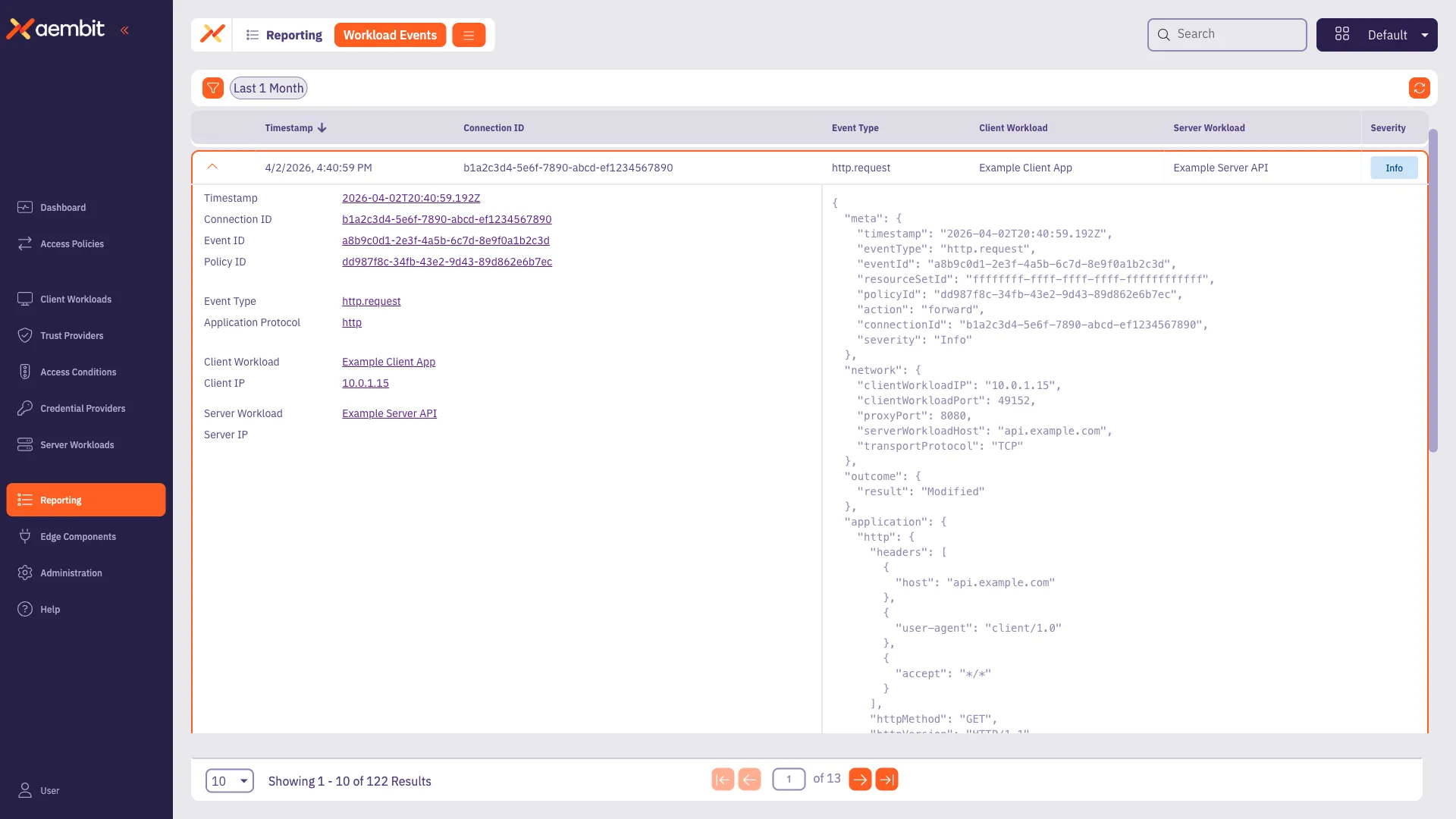
The expanded view displays the event metadata, workload identification, network details, outcome, and protocol-specific application data as described in Event structure.