Skip to content

MCP Identity Gateway enters beta with MCP Server and component copying

Aembit now offers an MCP Identity Gateway (Beta) that sits between AI agents and MCP servers, enforcing Access Policies, performing secure token exchange, and providing visibility into MCP activity. Deployed on a Linux VM, the Gateway ensures AI agents never hold direct credentials for enterprise systems.

Key capabilities:

  • Proxies MCP traffic with identity-aware policy enforcement
  • Performs secure token exchange using OAuth 2.0 and API key credentials
  • Provides per-user credential management and centralized MCP routing
  • Logs agent identity, user identity, and policy decisions for auditability
  • Fail-closed behavior—denies access by default unless explicitly allowed

For setup instructions and architecture details, see MCP Identity Gateway.


Aembit now provides an MCP Server that enables AI agents and users to query Aembit event logs using structured commands. Built on the Model Context Protocol specification, the MCP Server enables agentic observability and auditability for organizations using Aembit.

Key capabilities:

  • Query audit logs, authorization events, and workload events
  • Integrations with MCP Inspector, Claude Code, GitHub Copilot, and Visual Studio
  • Resource-set-based access scoping for least-privilege access
  • Read-only access—no create, update, or delete operations
  • Full audit trail of all MCP Server queries

For setup and connection guides, see Aembit MCP Server.


Aembit has added a new MCP User-Based Access Token Credential Provider type. This type enables per-user OAuth credentials for MCP servers using the OAuth 2.0 Authorization Code flow. The MCP Identity Gateway manages user-specific tokens when connecting to downstream MCP servers.

Key capabilities:

  • OAuth 2.0 Authorization Code flow with Proof Key for Code Exchange (PKCE) support
  • MCP Server URL discovery with auto-population of OAuth endpoints
  • Per-user credential scoping
  • Token introspection and lifetime management

For configuration details, see MCP User-Based Access Token Credential Provider.


Aembit now supports component copying between Resource Sets. You can replicate Access Policy components—including Client Workloads, Server Workloads, Trust Providers, Credential Providers, and Access Conditions—from one Resource Set to another. You can also copy entire Access Policies with all related components at once.

Key capabilities:

  • Copy individual components or entire Access Policies between Resource Sets
  • Each copy receives a unique identifier while the original remains unchanged
  • Supports environment promotion, regional deployments, and safe experimentation

For details, see About component copying and Copy components.

Azure Key Vault Credential Provider and OIDC SSO now available

Aembit has released new versions of the following components and packages:

  • Helm Chart
  • Terraform ECS module
  • Agent Proxy
  • AWS Lambda Extension
  • AWS Lambda Layer
  • Agent Injector

For the latest available versions of these components, see the Edge Components Supported Versions page.

Key Updates:

  • Azure Key Vault Private Network Access: Added support for accessing Azure Key Vault instances configured with private network endpoints
  • Performance Improvements: Enhanced performance for Secure Parameter Exchange (SPE) Postgres database operations
  • Dependency Updates: Updated multiple project dependencies to their latest stable versions
  • Rust and Hyper Upgrade: Upgraded to Rust 1.89.0 and introduced the hyper HTTP library for improved performance and security
  • Logging Enhancements: Internal improvements to logging functionality for better observability and debugging

Aembit has released the new Azure Entra Federation Credential Provider Integration and Azure Key Vault Credential Provider.

Together, they enable you to retrieve secrets from Azure Key Vault directly through Aembit using Azure’s Workload Identity Federation.

The Azure Entra Federation integration leverages OpenID Connect (OIDC) standards to authenticate with Azure Entra without requiring long-lived secrets or static credentials. This allows Aembit to securely access your Azure Key Vault instances using short-lived, federated tokens.

The Azure Key Vault Credential Provider supports:

  • Single value credentials (API keys, tokens)
  • Username/Password credentials
  • Both public and private network access scenarios
  • Policy-driven access controls and centralized auditing

See Azure Entra Federation Credential Provider Integration and Azure Key Vault Credential Provider to learn more.


You can now configure OIDC 1.0 Identity Providers for administrator Single Sign-On (SSO) authentication. This enables you to use OIDC-compliant identity providers such as Okta, Azure AD, and Auth0 to simplify the Aembit Tenant login process for your users. With OIDC support, you can leverage your existing identity infrastructure for secure, standardized authentication to the Aembit administrative console.

For more information, see Create an OIDC Identity Provider.

Global Policy Compliance, OIDC ID Token Credential Provider, and Splunk Log Streams now available

To increase the available deployment options for Amazon Web Services (AWS) Lambda users, Aembit now provides a Lambda Layer to support zip-based Lambda Functions. This joins our existing AWS Lambda Container support.

For more detailed information on how to deploy Aembit Edge Components to AWS Lambda Functions using our Lambda Layer, please refer to the AWS Lambda Functions documentation.


Introducing Global Policy Compliance for centralized security enforcement across your Aembit environment. This feature allows administrators to establish organization-wide security standards for Access Policies and Agent Controllers, ensuring consistent security practices and preventing the creation of policies that might inadvertently expose resources.

With Global Policy Compliance, you can enforce requirements for Trust Providers and Access Conditions across all Access Policies, as well as Trust Provider and TLS Hostname requirements for Agent Controllers. The three-tier enforcement model lets you set requirements as Required, Recommended (default), or Optional based on your organization’s security needs.

Global Policy Compliance visually identifies non-compliant components through color-coded status icons:

  • Red indicators for required but missing elements
  • Yellow indicators for recommended but missing elements
  • Green indicators for compliant Access Policies
  • Gray indicators for disabled or not active Access Policies

To learn more about Global Policy Compliance, see the Global Policy Compliance Overview.


Introducing OIDC ID Token Credential Provider for secure identity token generation and exchange with third-party services. By leveraging Aembit’s custom Identity Provider (IdP) capabilities, this Credential Provider generates JWT-formatted tokens that seamlessly integrate with various Workload Identity Federation (WIF) solutions.

The OIDC ID Token Credential Provider offers flexible configuration options including:

  • Custom claims configuration with both dynamic and literal subject support
  • Choice of signing algorithms (RS256 or ES256)
  • Integration with identity brokers such as AWS STS, GCP WIF, Azure WIF, and HashiCorp Vault

This new Credential Provider is particularly valuable for:

  • Secure access to cloud provider resources through their WIF solutions
  • Authentication with HashiCorp Vault using OIDC tokens
  • Integration with any service supporting OIDC/JWT authentication

To learn more about this feature, see About the OIDC ID Token Credential Provider.


Introducing Log Stream for Splunk SIEM to enhance your security monitoring capabilities. This integration enables rapid streaming of Aembit Edge event logs and audit logs directly to Splunk using Splunk’s HTTP Event Collector (HEC) protocol.

By connecting Aembit with Splunk SIEM, you can:

  • Enhance threat detection with comprehensive security data
  • Improve incident management through centralized logging
  • Streamline compliance monitoring for your organization

The setup process is straightforward, requiring only a properly configured HTTP Event Collector in your Splunk environment and a few configuration steps in the Aembit Admin UI. Aembit will automatically send email notifications if Log Stream transactions consistently fail, ensuring you’re always aware of your logging status.

To learn more about setting up this integration, see How to stream Aembit events to Splunk SIEM.
Standalone CAs and Credential Provider Integrations now available

Introducing Standalone CAs for more granular control over TLS Decrypt management. This feature allows you to create and manage dedicated Certificate Authorities (CAs) that function independently from Aembit’s default Tenant-level certificates.

With Standalone CAs, you can assign CAs directly to specific Client Workloads or Resource Sets, creating isolated trust boundaries and enabling precise management of TLS traffic across different environments. Aembit intelligently selects the appropriate CA using a clear hierarchy: Client Workload level -> Resource Set level -> Tenant level.

To learn more about Standalone CAs, see About Standalone CA for TLS Decrypt.


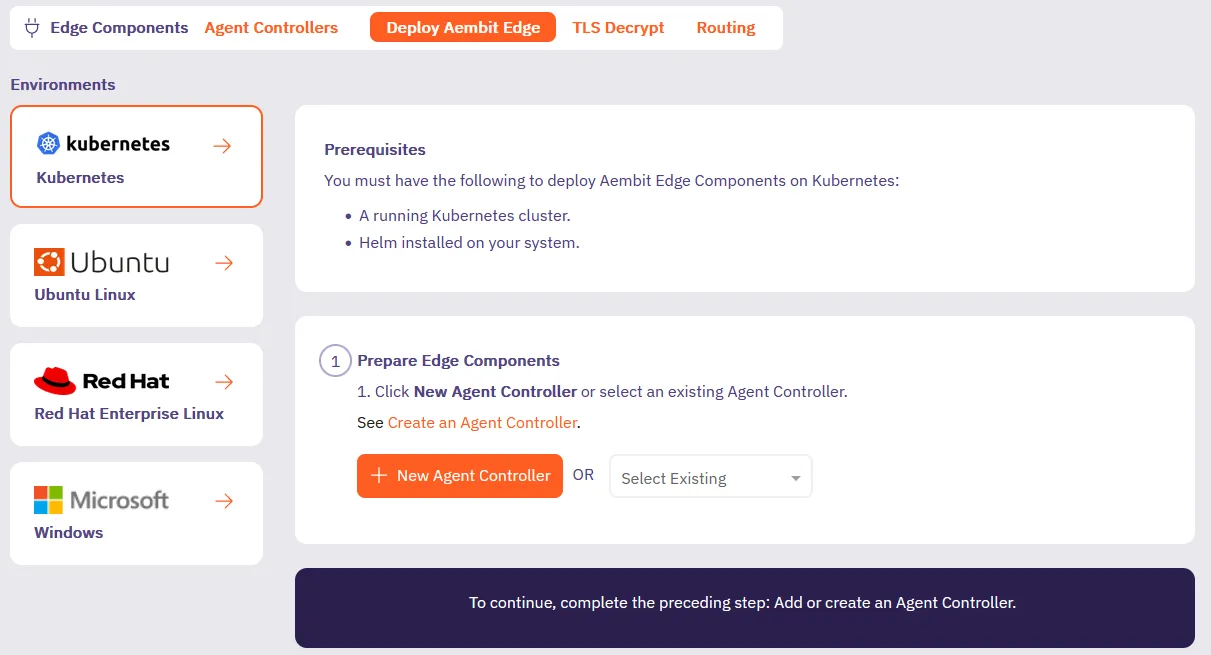
We’ve updated the Deploy Edge Components experience in the Aembit admin UI to streamline how you deploy Aembit Edge Components.

We’ve added deployment guides directly in the Aembit admin UI for each type of deployment such as Kubernetes, Ubuntu Linux, Red Hat Enterprise Linux, or Microsoft. Now when you’re deploying new Aembit Edge Components, you’ll have a guided experience to get you up and running faster.

Deploy Aembit Edge screen


Introducing Credential Provider Integrations, which automate credential lifecycle management for third-party systems. This feature makes sure your workloads always have valid credentials without manual management, enhancing both security and operational efficiency, eliminating manual credential management.

Our new Credential Provider Integrations feature makes this possible by connecting Aembit directly to third-party systems like with the GitLab Service Account integration. The GitLab Service Account integration enables you to create a Managed GitLab Account Credential Provider, which allows you to manage the credential lifecycle of your GitLab service accounts.

This gives you fine-grained control while eliminating the overhead of manual credential management.

Azure Entra Workload Identity Federation and automatic user creation now available

Aembit now supportsAzure Entra Workload Identity Federation as a Credential Provider. This enables you to automatically obtain credentials through Aembit as a third-party federated Identity Provider (IdP) to securely authenticate with Azure Entra to access your Azure Entra registered applications and managed identities.

Aembit now supports Automatic User Creation triggered by SSO login requests. Aembit has enhanced the Identity Provider configuration page with additional parameters, enabling you to map SAML attributes from your Identity Provider to the user roles defined in your Aembit Tenant.

You can now change the leaf certificate lifetime when using the TLS Decrypt feature.

Multi-Credential Provider Terraform support and Prometheus metrics now available

Aembit regularly releases new enhancements and improvements to Aembit Edge and Aembit Cloud components to provide additional features and functionality for your Aembit environment.

The following four new major features have been released:

  • Terraform Provider support for Access Policies with Multiple Credential Providers
  • Admin Dashboard enhancements and improvements
  • Exposure of Prometheus-compatible Aembit Edge metrics
  • Updated Edge Component Versions

Terraform Provider Support for Access Policies with Multiple Credential Providers

Aembit has released a Terraform Provider update that enables users to add multiple Credential Providers to an Access Policy.

Aembit now supports use cases where the Aembit Terraform Provider can manage Aembit Access Policies associated with individual or multiple Credential Providers.

For more information about this feature, please see the Multiple Credential Providers - Terraform page.

Admin Dashboard Enhancements and Improvements

Aembit continually makes improvements and enhancements to the Admin Dashboard to provide greater visibility and insight into your Aembit environment.

The Admin Dashboard has been updated and enhanced with additional tiles and panels that provide detailed information on Client and Server Workloads, Credential Usage by Type, the number of Access Condition failures based on Access Policies over the past 24 hours, and several other visualizations.

For more information on the Admin Dashboard and these additional panels, please see the Admin Dashboard Overview page.

Exposure of Prometheus-compatible Aembit Edge Metrics

Aembit aims to provides users with the ability to view detailed Aembit Edge metrics and data.

Aembit now exposes Prometheus-compatible metrics which enables users to view, and troubleshoot Aembit Edge Components (Agent Proxy, Agent Controller, and Agent Injector), while supporting both Kubernetes and virtual machine deployment models.

For more detailed information on how Aembit exposes Prometheus-compatible metrics, please see the Aembit Edge Prometheus-compatible Metrics page.

Aembit Edge Components Update

Aembit Edge Components have been updated to newer versions to improve overall performance and functionality.

The following components and packages have been updated:

  • Helm Chart
  • Terraform ECS Module
  • AWS Lambda Extension
  • VM Artifacts
  • Agent Controller
  • Agent Proxy

For the latest available versions of these components, please see the Edge Components Supported Versions page.

Custom Resource Sets now supported for GitHub Actions and GitLab Jobs

Aembit regularly provides feature and functionality updates to various components to extend capabilities and performance.

Aembit has released a feature improvement that enables you to work with Custom Resource Sets in GitHub Actions and GitLab Jobs CI/CD pipelines.

Custom Resource Set Support for GitHub Actions and GitLab Jobs

For users that would like to implement a CI/CD pipeline solution using Aembit with a custom Resource Set, separate from other workloads, Aembit has introduced Resource Set support for both GitHub Actions and GitLab Jobs.

Aembit supports Workload Identity and Access with GitHub Actions or GitLab Jobs, in your CI/CD workloads and encourages scoping these for appropriate access control. Adding support for Resource Sets in these solutions provides you with additional options and flexibility in best managing and protecting your CI/CD workloads.

For more information on how to configure Resource Sets in GitHub Actions and GitLab Jobs, please see the following pages:

Updated Admin Dashboard and multiple Credential Providers per Access Policy

Aembit recently released the following two updates to improve the Aembit user experience:

  • The Aembit Tenant UI has been updated with an expanded Admin Dashboard with additional metrics and data.
  • Access Policies have been improved to enable users to add multiple Credential Providers to Access Policies.

Updated Admin Dashboard

Aembit has released an updated Admin Dashboard with additional metrics and data you can review when logging into your tenant. You will now see the following metrics displayed from the last 24 hours:

  • Client Workloads (Managed)
  • Server Workloads (Managed)
  • Credentials (Usage By Type)
  • Workloads Connections (Managed)

Multiple Service Accounts per Access Policy

Aembit now supports the ability for you to have multiple Credential Providers associated with an Access Policy for specific use cases.

Adding and mapping multiple Credential Providers to an Access Policy can be very useful when you have a single Access Policy, but want to have different Credential Providers associated with that Access Policy.

For example, if you want to have the same Client Workload access the same Server Workload, but use different credentials for different functions, this feature enables you to specify the appropriate Credential Providers for each function on an Access Policy.

For more detailed information on how you can add multiple Credential Providers to an Access Policy, please see the Multiple Credential Providers page.

Resource Sets now available

Many organizations have certain security requirements that specify which resources should be managed by a group. To address these security needs, Aembit has released a new Resource Sets feature that enables you to determine which groups will have access to various resources.

You may find it necessary to segment management responsibilities for certain entities and resources in your Aembit environment between different individuals and groups for security reasons. To accommodate this requirement, Aembit has released the Resource Sets feature.

Resource Sets enable you to group entities and resources (e.g. Credential Providers, Trust Providers, Identity Providers, etc.) into a single collection and assign specific users to manage these resources.

For more detailed technical information on how to use create and manage Resource Sets, please refer to the Resource Sets technical documentation.

SAML SSO authentication now available for administrators

Aembit now supports SAML/SSO authentication for administrators who wish to simplify the Aembit Tenant login process for their users. Instead of requiring a user to enter their username/password credentials every time a user tries to access the Aembit Tenant, users will now be able to use a 3rd party SAML SSO Provider (e.g. Google, Okta, Microsoft Entrata) to log into the tenant.

For more information on how to configure Identity Providers using SAML, please see the Configuring Identity Providers technical documentation.

MFA support and Linux virtual machine Edge deployment now available

Several new feature updates and additions have been made to improve Aembit user experience. These updates include:

  • Admin console multi-factor authentication support
  • Edge components VM deployment support

Multi-factor authentication support

Aembit now supports Multi-Factor Authentication (MFA) so users can provide different authentication methods. Users can:

  • scan a QR code to configure their compatible authentication application
  • retrieve MFA Recovery Codes in case the device or application is unavailable
  • view the users who have configured MFA within the Aembit Users view.

Linux-based VM deployment support

Users may now deploy Aembit Edge Components to VMs (non-Kubernetes). This feature enables users to have options on how they want to deploy these components.

For more detailed information about this feature, please see the virtual machine Installation page.