Edge API authentication with AWS ECS
AWS ECS tasks (including ECS Fargate) authenticate with the Aembit Edge API using the
AWS Role attestation method.
You provide a signed AWS Security Token Service (STS)
GetCallerIdentity request,
signed with the task’s IAM role credentials.
Aembit calls GetCallerIdentity to verify the signature and confirm the task’s identity.
This is the same AWS Signature Version 4 (SigV4) request signing used for AWS IAM Role authentication. ECS differs only in where the role credentials come from: ECS exposes the task role credentials through the container credentials endpoint instead of an EC2 instance metadata service.
You can optionally include the task’s base64-encoded container and task metadata in the request to enable AWS ECS Service Name and AWS ECS Task Family Client Workload identification.
Prerequisites
Section titled “Prerequisites”To authenticate from an AWS ECS task, you must have the following:
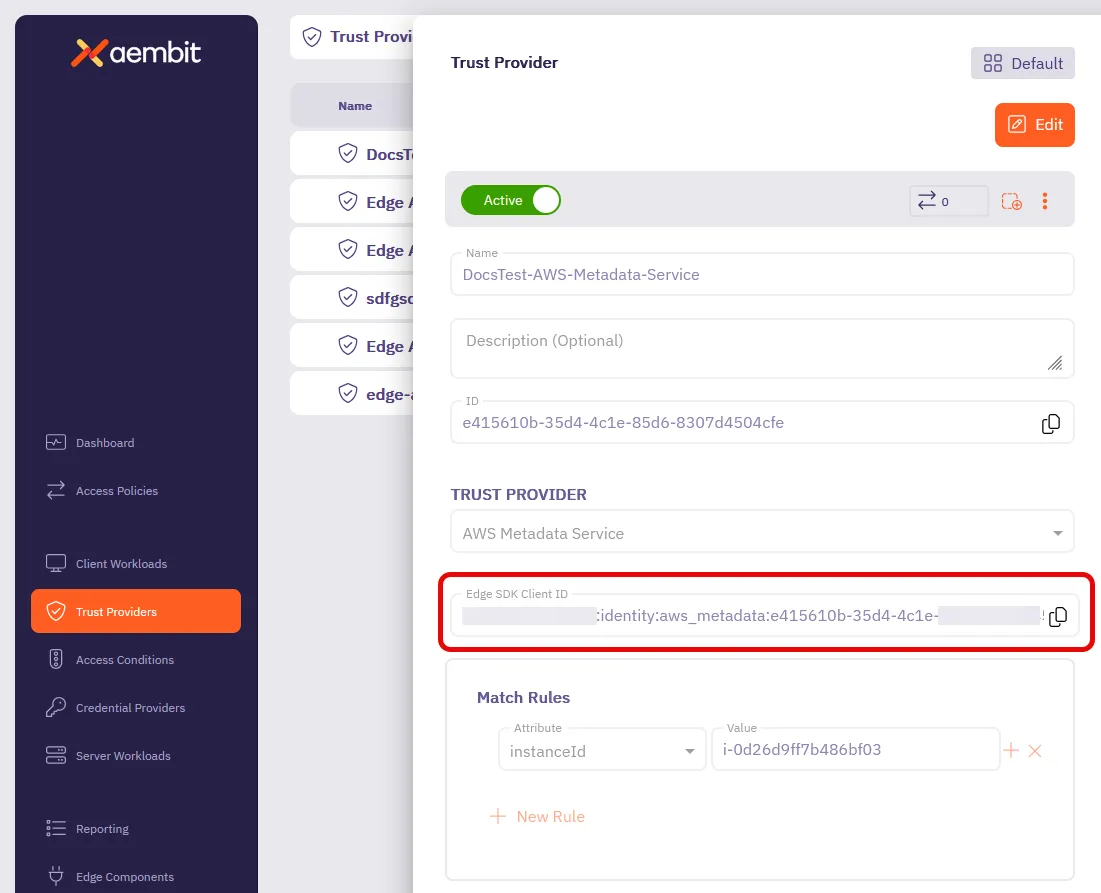
- Your Trust Provider’s Edge SDK Client ID from an AWS Role Trust Provider
- An ECS task with an attached task IAM role that the AWS Role Trust Provider’s match rules identify
- Terminal access to the running container (for example, through ECS Exec), or the equivalent logic running in your task
- Python 3.x with the
requestslibrary (for the Python method) or theboto3library (for the Boto3 method)
ECS provides the task role’s temporary credentials through the
container credentials endpoint,
addressed by the AWS_CONTAINER_CREDENTIALS_RELATIVE_URI environment variable that ECS sets automatically.
Authenticate from AWS ECS
Section titled “Authenticate from AWS ECS”To authenticate with the Aembit Edge API from an ECS task, follow these steps:
-
Retrieve the task role credentials from the ECS container credentials endpoint. ECS sets
AWS_CONTAINER_CREDENTIALS_RELATIVE_URIautomatically for tasks with an attached task role:Terminal window curl "169.254.170.2$AWS_CONTAINER_CREDENTIALS_RELATIVE_URI"You should get output similar to:
{"RoleArn": "arn:aws:iam::123456789012:role/ecsTaskRole","AccessKeyId": "ASIA42HLLFVDQQZD2PSX","SecretAccessKey": "iMapV1Wn6fKCanxLwsE1RGgzUy2H7BR95zMbmKuR","Token": "IQoJb3JpZ2luX2VjEO///////////wEaCXVzLWVhc3QtMSJI...","Expiration": "2025-01-15T16:30:45Z"}In the next step’s Python Script method, use
AccessKeyId,SecretAccessKey, andTokenas theACCESS_KEY,SECRET_KEY, andSESSION_TOKENvalues. The Boto3 method discovers these credentials automatically from the task environment, so you only need this manual retrieval for the Python Script method (or to confirm the credentials are present). You’ll also need the AWS region where your task runs. Unlike Lambda, ECS doesn’t inject the region as an environment variable. Use the region of your ECS cluster, or read it from theTaskARNfield returned by the task metadata endpoint (curl -s "$ECS_CONTAINER_METADATA_URI_V4/task"). The region is the fourth field of the ARN, as inarn:aws:ecs:us-east-1:123456789012:task/.... -
Generate the signed STS GetCallerIdentity request headers using one of the following methods. Both methods produce the same set of headers and the AWS region, which you’ll use to construct the authentication request payload.
Using this method, you’ll create a standalone Python script that manually implements AWS SigV4 signing.
Create a file named
generate_sts_headers.pywith the following content. Replace the placeholder values with the AWS credentials you retrieved in the previous step:import datetime, hashlib, hmac, json# Replace these with the AWS credentials you retrieved in the previous stepACCESS_KEY = "ACCESS_KEY_PLACEHOLDER"SECRET_KEY = "SECRET_KEY_PLACEHOLDER"SESSION_TOKEN = "SESSION_TOKEN_PLACEHOLDER" # Your full session tokenREGION = "REGION_PLACEHOLDER" # Your AWS regiondef sign(key, msg):return hmac.new(key, msg.encode("utf-8"), hashlib.sha256).digest()def getSignatureKey(key, date_stamp, regionName, serviceName):kDate = sign(('AWS4' + key).encode('utf-8'), date_stamp)kRegion = sign(kDate, regionName)kService = sign(kRegion, serviceName)kSigning = sign(kService, 'aws4_request')return kSigning# Request detailsmethod = 'POST'service = 'sts'host = f'{service}.{REGION}.amazonaws.com'endpoint = f'https://{host}/'content_type = 'application/x-www-form-urlencoded; charset=utf-8'request_parameters = "Action=GetCallerIdentity&Version=2011-06-15"# Create timestampt = datetime.datetime.now(datetime.timezone.utc)amz_date = t.strftime('%Y%m%dT%H%M%SZ')date_stamp = t.strftime('%Y%m%d')# Create canonical requestcanonical_uri = '/'canonical_querystring = ''canonical_headers = f'content-type:{content_type}\nhost:{host}\nx-amz-date:{amz_date}\nx-amz-security-token:{SESSION_TOKEN}\n'signed_headers = 'content-type;host;x-amz-date;x-amz-security-token'payload_hash = hashlib.sha256(request_parameters.encode('utf-8')).hexdigest()canonical_request = f'{method}\n{canonical_uri}\n{canonical_querystring}\n{canonical_headers}\n{signed_headers}\n{payload_hash}'# Create string to signalgorithm = 'AWS4-HMAC-SHA256'credential_scope = f'{date_stamp}/{REGION}/{service}/aws4_request'string_to_sign = f'{algorithm}\n{amz_date}\n{credential_scope}\n{hashlib.sha256(canonical_request.encode()).hexdigest()}'# Calculate signaturesigning_key = getSignatureKey(SECRET_KEY, date_stamp, REGION, service)signature = hmac.new(signing_key, string_to_sign.encode('utf-8'), hashlib.sha256).hexdigest()# Create authorization headerauthorization_header = f'{algorithm} Credential={ACCESS_KEY}/{credential_scope}, SignedHeaders={signed_headers}, Signature={signature}'# Output the headers needed for Aembit authenticationheaders_for_aembit = {"Content-Type": content_type,"X-Amz-Date": amz_date,"X-Amz-Security-Token": SESSION_TOKEN,"Authorization": authorization_header}print("Headers for Aembit stsGetCallerIdentity:")print(json.dumps(headers_for_aembit, indent=2))print(f"\nRegion: {REGION}")Run the script and note the output headers and region:
Terminal window python3 generate_sts_headers.pyUsing this method, you’ll use the AWS SDK for Python (Boto3). Boto3 handles credential discovery and request signing for you.
-
Install Boto3 if not already available:
Terminal window # pippip3 install boto3# aptapt install python3-boto3 -
Create a Python script named
generate_sts_headers_boto3.pythat uses Boto3’s internal signing mechanisms:import boto3import jsonfrom botocore.auth import SigV4Authfrom botocore.awsrequest import AWSRequest# Boto3 automatically uses the credentials available in your AWS environmentsession = boto3.Session()credentials = session.get_credentials()# Set your regionregion = 'REGION_PLACEHOLDER' # Change to your AWS region# Create the STS GetCallerIdentity requestrequest = AWSRequest(method='POST',url=f'https://sts.{region}.amazonaws.com/',data='Action=GetCallerIdentity&Version=2011-06-15',headers={'Content-Type': 'application/x-www-form-urlencoded; charset=utf-8'})# Sign the request using SigV4SigV4Auth(credentials, "sts", region).add_auth(request)# Extract headers for Aembit authenticationheaders_for_aembit = {'Content-Type': request.headers.get('Content-Type'),'X-Amz-Date': request.headers.get('X-Amz-Date'),'X-Amz-Security-Token': request.headers.get('X-Amz-Security-Token'),'Authorization': request.headers.get('Authorization')}print("Headers for Aembit stsGetCallerIdentity:")print(json.dumps(headers_for_aembit, indent=2))print(f"\nRegion: {region}") -
Run the script:
Terminal window python3 generate_sts_headers_boto3.py
-
-
(Optional) Get the container and task metadata to include for Client Workload identification.
ECS exposes the Task Metadata Endpoint version 4 through the
ECS_CONTAINER_METADATA_URI_V4environment variable. Query the container and task metadata, then base64-encode each response using standard base64 on a single line:Terminal window # Container metadata, base64-encodedcurl -s "$ECS_CONTAINER_METADATA_URI_V4" | base64 -w 0# Task metadata, base64-encoded (includes the task family and, for service-launched tasks, the service name)curl -s "$ECS_CONTAINER_METADATA_URI_V4/task" | base64 -w 0Use the base64-encoded container and task metadata as the
containerMetadataandtaskMetadatavalues in the next step. These let Aembit match the ECS Service Name and ECS Task Family. -
Construct the authentication request payload using the
clientId, the headers and region from the signing step, and—optionally—thecontainerMetadataandtaskMetadata:{"clientId": "<edge-sdk-client-id>","client": {"aws": {"stsGetCallerIdentity": {"headers": {"Content-Type": "application/x-www-form-urlencoded; charset=utf-8","X-Amz-Date": "20250115T103045Z","X-Amz-Security-Token": "IQoJb3JpZ2luX2VjEO...","Authorization": "AWS4-HMAC-SHA256 Credential=ASIA42HLLFVDQQZD2PSX/20250115/us-east-1/sts/aws4_request, SignedHeaders=content-type;host;x-amz-date;x-amz-security-token, Signature=abc123..."},"region": "<region-from-signing-step>"},"ecs": {"containerMetadata": "<base64-encoded-container-metadata>","taskMetadata": "<base64-encoded-task-metadata>"}}}} -
Send the authentication request to your Aembit Edge API endpoint:
Terminal window curl --location 'https://<your-aembit-edge-url>/edge/v1/auth' \--header 'Content-Type: application/json' \--data '{"clientId": "your-edge-sdk-client-id","client": {"aws": {"stsGetCallerIdentity": {"headers": {"Content-Type": "application/x-www-form-urlencoded; charset=utf-8","X-Amz-Date": "20250115T103045Z","X-Amz-Security-Token": "IQoJb3JpZ2luX2VjEO...","Authorization": "AWS4-HMAC-SHA256 Credential=ASIA42HLLFVDQQZD2PSX/20250115/us-east-1/sts/aws4_request, SignedHeaders=content-type;host;x-amz-date;x-amz-security-token, Signature=abc123..."},"region": "us-east-1"}}}}'When successful, you’ll receive output similar to:
{"accessToken": "eyJhbGciOiJSUzI1NiIsImtpZCI6IkpyR3JLQ0x6RVFN...","tokenType": "Bearer","expiresIn": 3600} -
Use the
accessTokenas thebearerTokenin subsequent API calls to authenticate your requests. This token is valid for the duration specified inexpiresIn(in seconds).
How to find your Edge SDK Client ID
Section titled “How to find your Edge SDK Client ID”-
Log in to your Aembit Tenant.
-
Go to the Trust Providers section in the left sidebar.
-
Select the Trust Provider you want to use for Edge API authentication.
-
In the TRUST PROVIDER section, find the Edge SDK Client ID field.
-
Copy the Edge SDK Client ID to use in your authentication requests.